EMSOptimizer Concepts
This page introduces the core concepts used in EMSOptimizer.
Overview
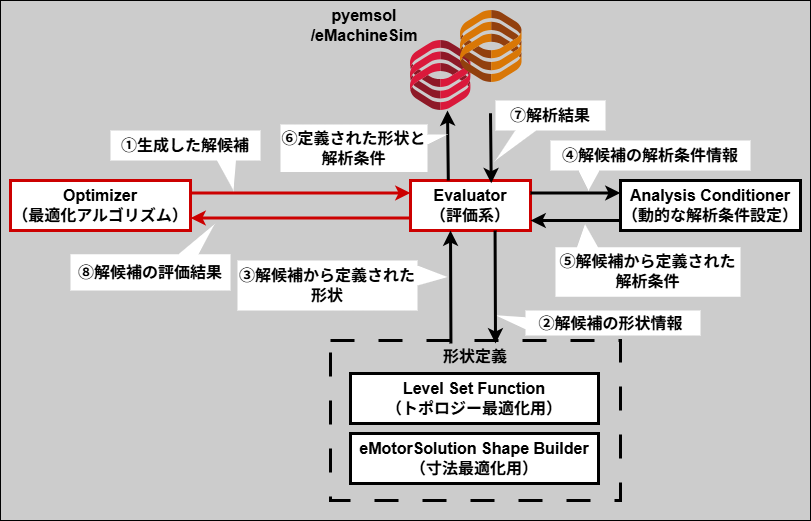
The following figure shows how the EMSOptimizer functions (hereafter, core objects) work together. The sequence ①→②→...→⑧ represents one iteration; optimization proceeds by repeating this sequence.
Steps ②–⑦ are executed only for shape optimization (that is, when evaluator is pyemsol_shape_evaluator).
The processing for steps ②–⑦ is included in the emsopt_analyzer package.
Core object implementation examples
EMSOptimizer provides ready-to-use implementation examples of its core objects. The examples are located in the core > {コアオブジェクト名称} > examples folder within the EMSOptimizer folder.
You can use the existing examples, modify them, or create new implementations and combine them freely. The implementations to use are specified in optimization.yaml.
- How to configure
optimization.yaml→ User Guide > Optimization settings - Details and settings for each implementation example → corresponding sections in the User Guide
- How to create custom core objects → Advanced Topics > Creating custom core objects
Optimizer
This object is responsible for the optimization algorithm (generating and updating candidate solutions). It receives candidate solutions evaluated by evaluator, generates new candidate solutions, and passes them to evaluator.
Some EMSOptimizer-provided implementation examples are listed below.
cmaes: Single-objective CMA-ES optimization algorithm [4], [5].nsga2: Multi-objective NSGA-II optimization algorithm [6].decomposition_ensemble: MOEA/D-based multi-objective implementation example [7]. It decomposes multi-objective optimization into multiple single-objective problems, each solved by CMA-ES [8].
Evaluator
This object is responsible for evaluating candidate solutions. It evaluates candidate solutions generated by optimizer (calculating objective and constraint function values) and returns the results to optimizer.
Some EMSOptimizer-provided implementation examples are listed below.
sphere: Single-objective Sphere benchmark function [11].rastrigin: Single-objective Rastrigin benchmark function [11].zdt1: Multi-objective ZDT1 benchmark function [9].pyemsol_shape_evaluator: Evaluation implementation for shape optimization. It analyzes shapes defined byls_functionandems_shape_builderwith the pyemsol electromagnetic simulator and calculates objectives and constraints defined inoptimization_problem.yaml(foroptimizer_problem.yaml, see Optimization-problem settings).
pyemsol_shape_evaluator is defined in the emsopt_analyzer package and has no implementation in the examples folder.
The emsopt_analyzer package must be installed to run shape optimization with pyemsol_shape_evaluator.
The sphere, rastrigin, and zdt1 functions are optimization benchmarks that can be used to check optimizer performance before running shape optimization.
EMSOptimizer has no explicit “shape optimization mode.”
Simply setting evaluator to pyemsol_shape_evaluator causes the relevant shape calculations to be performed internally.
Therefore, shape optimization can be run in exactly the same way as benchmark-function optimization, although shape optimization requires machine.yaml and optimization_problem.yaml settings.
Level Set Function
This is the level set function used in topology optimization. It calculates the output of the level set function from the corresponding variables in a candidate-solution vector.
When evaluator is set to pyemsol_shape_evaluator, it calculates function values at each location in the design target defined in machine.yaml. Material assignment is performed inside pyemsol_shape_evaluator based on these values.
In EMSOptimizer, a level-set function is any function that returns positive or negative values at each location in the design region (more precisely, at the center coordinates of each element).
More generally, the term often refers specifically to a function used in the level-set method (a topology-optimization method) to represent material boundaries.
Some EMSOptimizer-provided implementation examples are listed below.
ls_r: Simple implementation that sets levels by radius.ngnet: NGnet function [3].ngnet_mixture: Implementation example combiningls_randngnetto apply NGnet within or outside a specified radius.ngnet_multi_material: Multi-material NGnet function [3].
AnalysisConditioner
This object dynamically configures analysis conditions (such as the current phase angle and magnetization direction) for shape optimization. It is used when evaluator is set to pyemsol_shape_evaluator and changes analysis-condition parameters based on the corresponding variables in the candidate-solution vector.
Thus, configuring this object makes it possible to include analysis conditions in the optimization.
Some EMSOptimizer-provided implementation examples are listed below.
phase_conditioner: Changes the current phase angle.
eMotorSolution Shape Builder
This object defines shapes for dimensional optimization. It can be used when evaluator is pyemsol_shape_evaluator and eMotorSolution integration is enabled; it sets motor component dimensions based on the corresponding variables in the candidate-solution vector.
For eMotorSolution integration, see Advanced Topics > eMotorSolution integration.
Some EMSOptimizer-provided implementation examples are listed below.
HoleMagnet55: eMotorSolution HoleMagnet Type 55 permanent-magnet definition, used in theIPM8P48S_ptoproject.
In EMSOptimizer, analysis_conditioner, ls_function, and ems_shape_builder can all be configured independently and simultaneously. In particular, configuring ems_shape_builder together with ls_function enables simultaneous shape and topology optimization [10].
More specifically, the candidate-solution vector is interpreted as follows.
: candidate-solution vector
: analysis-condition information vector passed to analysis_conditioner
: shape-information vector passed to ems_shape_builder
: level-set-function parameter vector passed to ls_function
Among , , and , the vector corresponding to an unconfigured object is treated as a zero vector.
manager/optimization_manager.py coordinates evaluator and optimizer.
The manager folder also defines classes for CLI handling, GUI output, and file output.