Dmodel Gradient-Based Optimization Example (Level Set Method)
This page introduces the Dmodel_SynRM_gradient_ls project.
The Dmodel_SynRM_gradient_ls project assumes a synchronous reluctance motor (SynRM) and performs optimization using a gradient-based topology optimization method (level set method).
Base mesh
Dmodel_SynRM_gradient_ls uses a rotor with two layers of flux barriers as the initial shape, as shown below, and optimizes its material boundaries using a level set method based on a smooth Heaviside function[27].
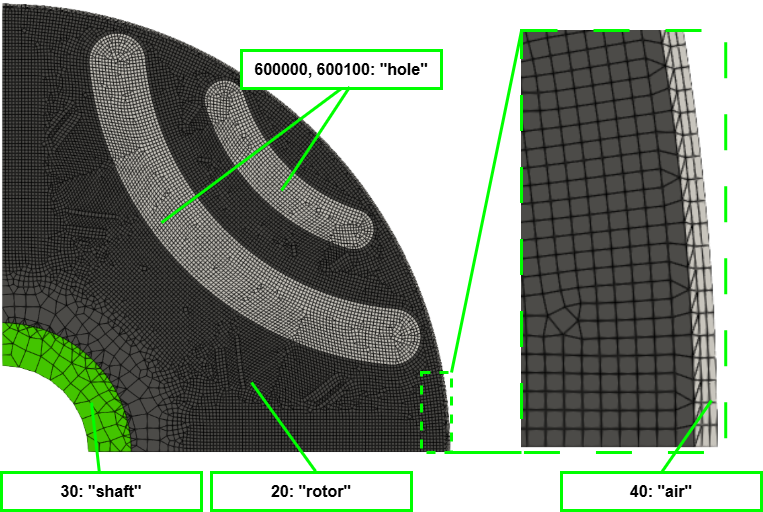
machine.yaml (Dmodel_SynRM_gradient_ls project)
In machine.yaml, set calc_levelset_init to True to calculate the level set function values (signed distance function) at each position in the initial shape. These values are used as the initial design variables.
In the level set method, the design variables must also be reinitialized appropriately. This project performs reinitialization every generation. See the Machine Configuration page for details about these configurations.
calc_levelset_init: True
levelset_reinit_interval: 1
levelset_reinit_weight: 0.2
Implicit Domain Meshing can also be applied to the level set method[29],[30]. This produces a mesh with a clear material boundary along the zero level set of the level set values.
To enable Implicit Domain Meshing, set use_implicit_domain_meshing to True, as in the Dmodel project example.
optimization.yaml (Dmodel_SynRM_gradient_ls project)
In optimization.yaml, set level_set_function to pyemsol_density. This causes EMSOptimizer to calculate the gradient of objective W1 (torque) internally. The design region is set slightly smaller than the rotor region so that a rib remains around the outer circumference.
The calculated gradient is used by optimizer > gradient_update to update the design variables (here, the level set function value of each element in the design region).
Because the signed distance function values of the initial shape are used as the initial design variables, the path to the initial-value CSV file is set in init_value_filepath. Since the signed distance values are on the millimeter scale, move_limit is set to 0.0001. To allow changes only near the boundary, pyemsol_density > proj_half_width is set to 0.0005, so only the range within ±0.5 mm of the material boundary (the zero level set) can change at each optimization step.
When level_set_function is pyemsol_density, a dry run (an empty analysis used to obtain design-region information, etc.) is performed before optimization. The initial level set function values are also calculated by the dry run.
The dry-run results are stored in the dry_run folder under resource_dir.
evaluator:
  name: pyemsol_shape_evaluator
optimizer:
  name: gradient_update
  kwargs:
    init_value_filepath: "path/to/EMSOptimizer/projects/Dmodel_SynRM_gradient_ls/optimization_studies/default/resources/dry_run/transient/design_ls_parameters.csv"
    diffusion_coef: 0.0  # 拡散無し
    move_limit: 0.0001
level_set_function:
  name: pyemsol_density
  kwargs:
    proj_method: heaviside5
    proj_half_width: 0.0005
    objective_type: W1
    torque_scale: 4.0
    coordinate: Polar
    design_region: [[0.0080, 0.0273], [0.0, 45.0]]
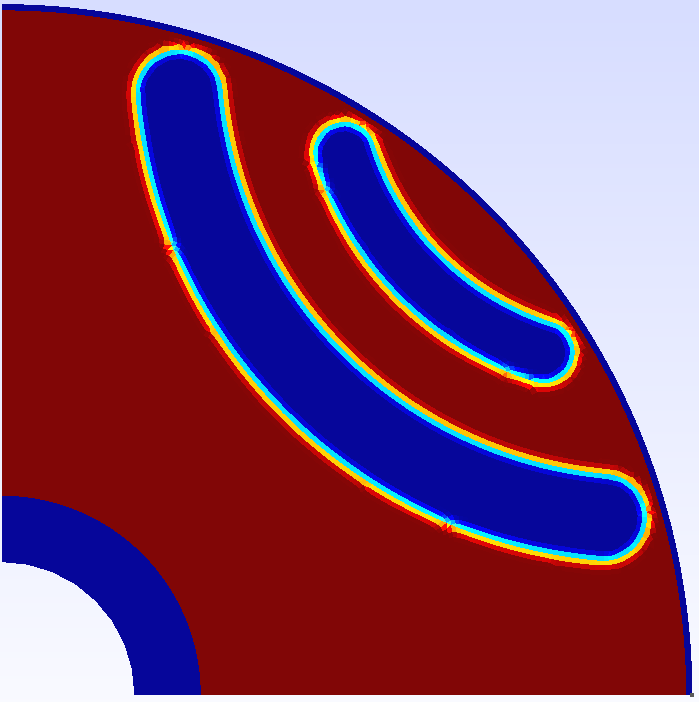
The following figure visualizes the material density values obtained by applying heaviside5 to the signed distance values of the initial shape (red: magnetic core; blue: air). Changes may occur near material boundaries where the density has an intermediate value.
Because reinitialization occurs several times during optimization, the material boundary is recalculated at those points, and the values near the boundary are recalculated accordingly.
optimization_problem.yaml (Dmodel_SynRM_gradient_ls project)
When pyemsol_density is used, the objective function specified in its arguments is calculated internally. optimization_problem.yaml is used to configure case_names and to determine move-limit damping in gradient_update.
case_names:
  - transient

objectives:
  - function_name: average_torque
    kwargs:
      torque_scale: 4.0
    coefficient: -1.0

ineq_constraints: []

eq_constraints: []

other_metrics:
  - function_name: average_torque
    kwargs:
      torque_scale: 4.0
Optimization Example
This example performs 50 optimization iterations.
The following animation shows the shape evolution over 50 iterations (the best shape from each iteration). Gray areas have intermediate material-property values (grayscale), while black areas are magnetic core; the rotor surface can be seen changing gradually.

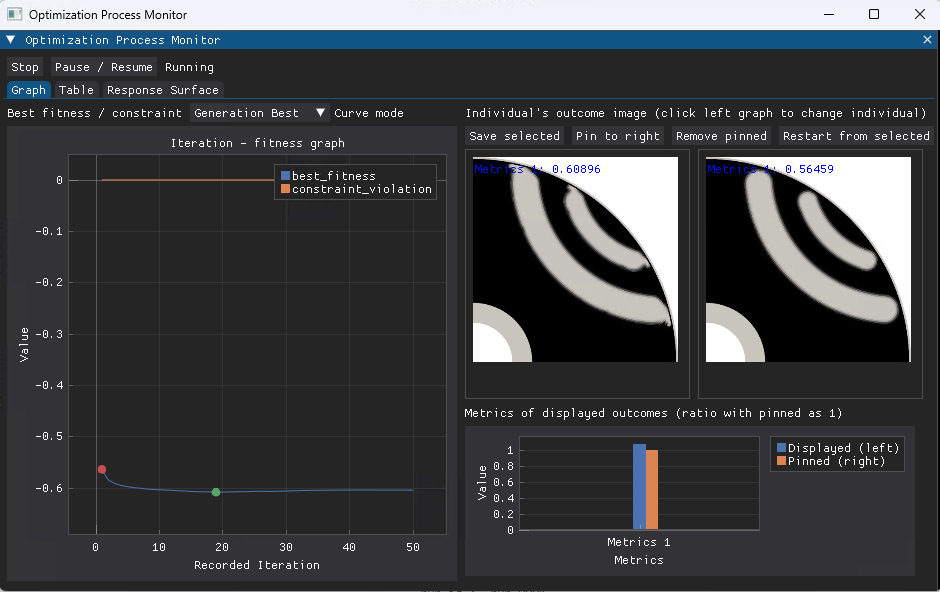
The GUI after completing 50 optimization iterations is shown below. The best value was recorded at iteration 19.
Compared with the initial shape (on the right in the figure), the average torque improved from 0.56459 Nm to 0.60896 Nm.