export()
Saves a screenshot of the rendered scene to an image file via plotter.screenshot().
If a file-backed mesh is loaded, export() triggers the same full visualization pipeline rebuild as show() before capturing the image — so all configured pipeline components (set_scalar(), set_contour(), set_vector(), set_feature_edges()) are applied automatically.
If no mesh is loaded, the current state of the underlying plotter is captured as-is.
Parameters
filename(str | Path) — Output image path. Supported formats:*.png,*.jpg,*.tif.transparent_background(bool, default:False) — Save with a transparent background (PNG only).window_size(tuple[int, int], default:(800, 600)) — Offscreen render resolution in pixels.scale(float | None, default:None) — Resolution scaling factor. For example,scale=2doubles the pixel dimensions relative towindow_size.
Returns
Plotter— returnsselfto enable chaining.
Example
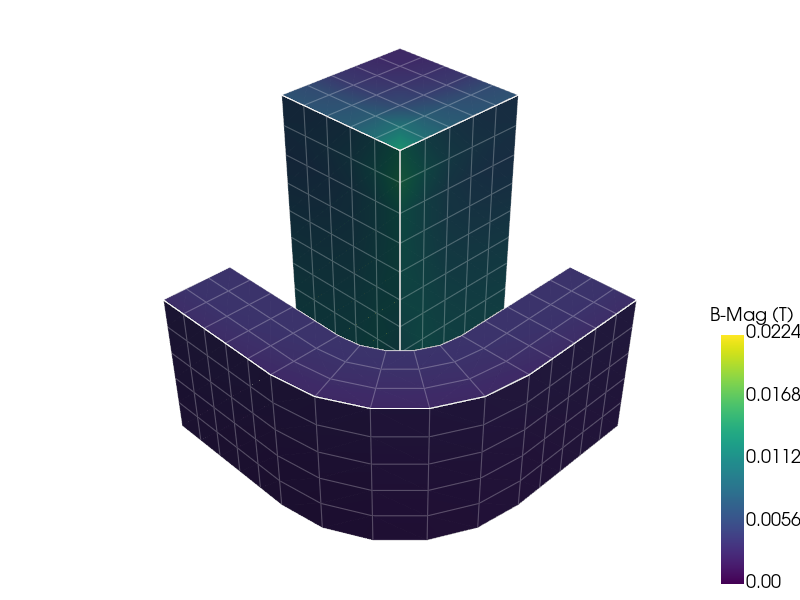
from pyemsi import Plotter, examples

file_path = examples.transient_path()
plt = Plotter(file_path)
plt.set_scalar("B-Mag (T)", scalar_bar_args={"vertical": True})
plt.set_block_visibility("4", False)
plt.export("docs/static/demos/exported_plot.png")
The output image would look like the following:
See also
show()— render interactively instead of saving to fileset_scalar()— configure scalar field coloringset_contour()— add contour linesset_vector()— overlay vector glyphsset_feature_edges()— configure edge overlay