
14. Periodic Boundary Conditions#
Sets periodic boundary conditions. In particular, when analyzing a rotating machine, appropriate periodic boundary conditions and sliding-motion settings must be specified.
Settings#
14_Periodic_Boundary_Conditions JSON key: Periodic boundary condition object
PERIODIC_CONDITION(14) JSON key: Periodic boundary condition settings object
CYCLIC(14) Sets the periodic boundary condition
SYMMETRY(14) Sets periodic and antiperiodic boundary conditions
N_CYCLIC(14) Sets multiple periodic boundary conditions
Translational periodic boundary condition (when CYCLIC = 1)
DXYZ(14)Mesh length in the translational direction for one period
Rotational periodic boundary condition (when CYCLIC = 2 or 3)
ANGLE(14)Mesh angle for one rotational period
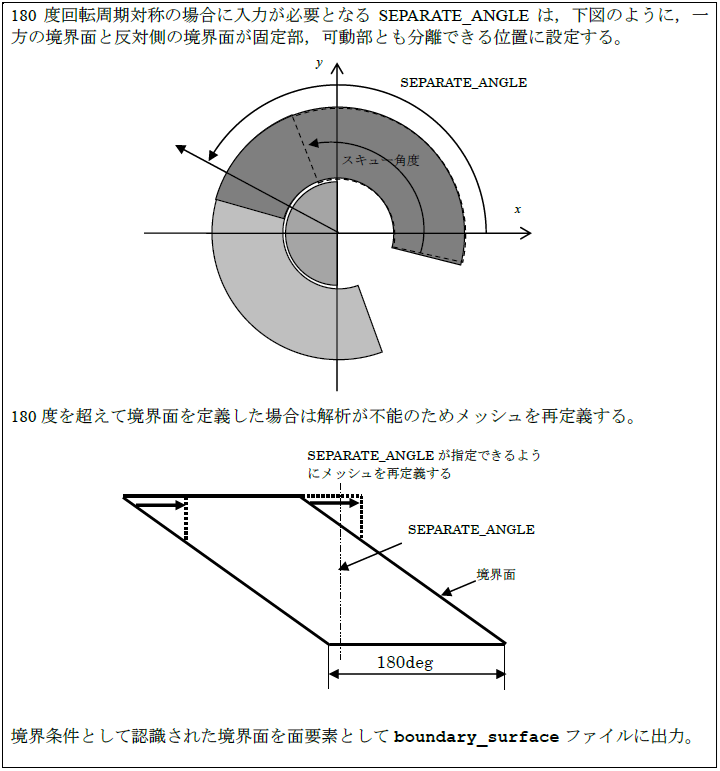
SEPARATE_ANGLE(14)Angle used to distinguish rotational periodic boundary surfaces
Helical periodic boundary condition (when CYCLIC = 4)
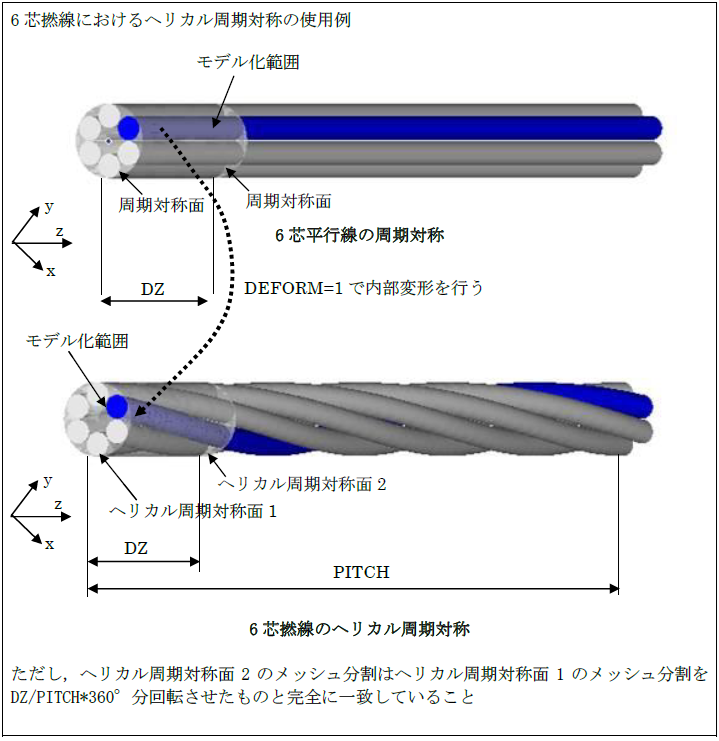
DXYZ(14)Mesh length in the helical translation direction for one period
PITCH(14)Twist-pitch length in the helical translation direction for one period
DEFORM(14)Sets internal twisting of a model along a straight line
When setting sliding motion ( MOTION(2) = 2)
PERIODIC_CONDITION(14)JSON key: Periodic boundary condition settings object
SLIDE_NDIV(14)Number of divisions in the motion direction during sliding-motion analysis
SLIDE_MAT_ID(14)Specifies the material ID of the sliding points or sliding edges during sliding motion
FITNESS(14)Criterion for determining the mesh-position match between the moving and stationary sides during sliding motion
LINE_INPUT(14)Specifies sliding edges as line segments
START_END_XYZ(14)JSON key: Specifies sliding edges by their start and end points
MESH_NO(14)Number of the mesh file defining the sliding edges
NO_LINES(14)Number of line segments specified by LINE_INPUT
NUMBER_SLIDING_FACES(14)Specifies multiple sliding surfaces
14_2_Regular_Mesh_Condition_for_STEADY_CURRENT JSON key: Steady-current eddy-field analysis condition object
NO_REGULAR_MESH(14)Sets the steady-current eddy-field analysis conditions
VELOCITY(14)Velocity of the moving conductor
REGULAR_NDIV(14)Number of equal divisions in the moving-conductor direction
REGULAR_NMAT(14)Number of material IDs for the moving conductor
MAT_ID_NOS(14)List of material IDs for the moving conductor
Input format#
Text-format section
- Type:
Fixed parameter set 1
- Number of rows:
1
- Number of parameters:
8
* CYCLIC  *  SYMMETRICITY * SLIDE_NDIV * SLIDE_MAT_ID * FITNESS * LINE_INPUT * N_CYCLIC * SLIDE_OPTION *
    I             I             I            I           E          I           I            I
- Type:
Additional parameter set 1 | when CYCLIC=1
- Number of rows:
1 * NUMBER_SLIDING_FACES
- Number of parameters:
3
* DX * DY * DZ *
E    E    E
- Type:
Additional parameter set 2 | when CYCLIC=2 or 3
- Number of rows:
1 (2; SEPARATE_ANGLE is required when ANGLE=180) * NUMBER_SLIDING_FACES
- Number of parameters:
1 (1)
* ANGLE *
    E
* SEPARATE_ANGLE *
        E
- Type:
Additional parameter set 3 | when CYCLIC=4
- Number of rows:
1
- Number of parameters:
5
* DX * DY * DZ * PITCH * DEFORM *
E    E    E     E       I
- Type:
Additional parameter set 4 | when LINE_INPUT=1 and SLIDE_MAT_ID≠-1
- Number of rows:
1 * NUMBER_SLIDING_FACES
- Number of parameters:
7
* SX * SY * SZ * EX * EY * EZ * MESH_NO *
E    E    E    E    E    E     I
- Type:
Additional parameter set 5 | when SLIDE_MAT_ID=-1 (multiple sliding surfaces)
- Number of rows:
1
- Number of parameters:
1
* NUMBER_SLIDING_FACES *
        I
- Type:
Additional parameter set 4 | when SLIDE_MAT_ID=-1 (multiple sliding surfaces)
- Number of rows:
1 * NUMBER_SLIDING_FACES
- Number of parameters:
3
* SLIDE_NDIV * SLIDE_MAT_ID * FITNESS
    I             I           E
- Type:
Additional parameter set 5 | when STEADY_CURRRENT(2)=1 or when the steady-current eddy-field analysis result is used as the initial value and MULTI≠0
- Number of rows:
3
- Number of parameters:
5
* NO_REGULAR_MESH *
    I
* VELOCITY * REGULAR_NDIV * REGULAR_NMAT *
    E            I              I
* MAT_ID_NOS *
    I
Text examples
No periodic boundary condition
* CYCLIC  *  SYMMETRICITY * SLIDE_NDIV * SLIDE_MAT_ID * FITNESS * LINE_INPUT * N_CYCLIC * SLIDE_OPTION *
    0
For a 90-degree rotationally antiperiodic model: mesh divided into 90 parts in the sliding direction, with MatID=51 specified for the sliding-edge elements
* CYCLIC  *  SYMMETRICITY * SLIDE_NDIV * SLIDE_MAT_ID * FITNESS * LINE_INPUT * N_CYCLIC * SLIDE_OPTION *
    2             1            90            51
* ANGLE *
90
Multiple sliding surfaces
When there are two sliding surfaces with translational antisymmetry. Specify the sliding surfaces with LINE_INPUT=1.
* CYCLIC * SYMMETRICITY * DIVISION * SURFACE_MAT_ID * FITNESS * LINE_INPUT * N_CYCLIC *
    1            1             32         -1           0.1        1       1
* DX * DY * DZ *
0.08  0.0 0.0
* NUMBER_SLIDING_FACES *
        2
* DIVISION * SURFACE_MAT_ID * FITNESS *
    32           31            0.1
* SX * SY * SZ * EX * EY * EZ * MESH_NO *
0.0  0.0  0.0125 0.0 0.06 0.0125   0
* DIVISION * SURFACE_MAT_ID * FITNESS *
    32           32            0.1
* SX * SY * SZ * EX * EY * EZ * MESH_NO *
0.0 0.0 -0.0125 0.0 0.06 -0.0125   0
When STEADY_CURRRENT(2)=1 or when the steady-current eddy-field analysis result is used as the initial value and MULTI≠0
* NO_REGULAR_MESH *
    0
* VELOCITY * REGULAR_NDIV * REGULAR_NMAT *
    10.0         32             1
* MAT_ID_NOS *
    32
JSON format#
Not required when no periodic boundary condition is used.
Set multiple periodic boundary conditions as an array in PERIODIC_CONDITION. Set multiple sliding surfaces as an array as well.
"14_Periodic_Boundary_Conditions" :
{
    "PERIODIC_CONDITION" :
    [
        {
            "CYCLIC" : I,
            "SYMMETRY" : I,
            "ANGLE" : E,
            "SLIDE_CONDITION" :
            [
                {
                    "SLIDE_NDIV" : E,
                    "SLIDE_MAT_ID" : I,
                    "FITNESS" : E
                }
            ]
        },
        {
            "CYCLIC" : I,
            "SYMMETRY" : I,
            "DXYZ" : [ E, E, E ],
            "SLIDE_CONDITION" :
            [
                {
                    "SLIDE_NDIV" : I,
                    "FITNESS" : E,
                    "LINE_INPUT" :
                    {
                        "MESH_NO" : I,
                        "START_END_XYZ" :
                        [
                            [ E, E, E, E, E, E ]
                        ]
                    }
                }
            ]
        }
    ]
},
JSON examples
For a 90-degree rotationally antiperiodic model: mesh divided into 90 parts in the sliding direction, with
SLIDE_MAT_ID= 51 specified for the sliding-edge elements
"14_Periodic_Boundary_Conditions" :
{
    "PERIODIC_CONDITION" :
    [
        {
            "CYCLIC" : 2,
            "SYMMETRY" : 1,
            "ANGLE" : 90,
            "SLIDE_CONDITION" :
            [
                {
                    "SLIDE_NDIV" : 90,
                    "SLIDE_MAT_ID" : 51,
                    "FITNESS" : 0.0
                }
            ]
        }
    ]
},
Multiple sliding surfaces
When there are two sliding surfaces with translational antisymmetry. Specify the sliding surfaces with LINE_INPUT = 1.
"14_Periodic_Boundary_Conditions" :
{
    "PERIODIC_CONDITION" :
    [
        {
            "CYCLIC" : 1,
            "SYMMETRY" : 1,
            "DXYZ" : [ 0.08, 0.0, 0.0 ],
            "SLIDE_CONDITION" :
            [
                {
                    "SLIDE_NDIV" : 32,
                    "FITNESS" : 0.1,
                    "LINE_INPUT" :
                    {
                        "MESH_NO" : 0,
                        "START_END_XYZ" :
                        [
                            [ 0.0, 0.0, 0.0125, 0.0, 0.06, 0.0125 ]
                        ]
                    }
                },
                {
                    "SLIDE_NDIV" : 32,
                    "FITNESS" : 0.1,
                    "LINE_INPUT" :
                    {
                        "MESH_NO" : 0,
                        "START_END_XYZ" :
                        [
                            [ 0.0, 0.0, -0.0125, 0.0, 0.06, -0.0125 ]
                        ]
                    }
                }
            ]
        }
    ]
},
Steady-current eddy-field analysis (when STEADY_CURRRENT(2) = 1 or when the steady-current eddy-field analysis result is used as the initial value and MULTI ≠ 0)
"14_2_Regular_Mesh_Condition_for_STEADY_CURRENT" :
    [
            {
                    "VELOCITY" : 10.0,
                    "REGULAR_NDIV" : 32,
                    "REGULAR_MAT_IDS" : [ 1 ]
            }
    ]
Detailed description#
14_Periodic_Boundary_Conditions#
- 14_Periodic_Boundary_Conditions#
- JSON key:
Periodic boundary condition object
PERIODIC_CONDITION#
- PERIODIC_CONDITION(14)#
- JSON key:
Periodic boundary condition settings object
CYCLIC#
- CYCLIC(14)#
Text-format section
[row, col] = [1, 1]
Value |
Description |
|---|---|
0 Default value |
No periodic boundary condition. |
1 |
Translational periodic symmetry. |
2 |
Rotational periodic symmetry. |
3 |
Symmetric with respect to rotational periodicity and z inversion. |
4 |
Helical periodic symmetry. |
SYMMETRY#
- SYMMETRY(14)#
Text-format section
[row, col] = [1, 2]
Value |
Description |
|---|---|
0 Default value |
Periodic boundary condition. The magnetic-field/electric-field direction does not change under the symmetry transformation. |
1 |
Antiperiodic boundary condition. The magnetic-field/electric-field direction is reversed under the symmetry transformation. |
Translational periodic boundary condition (when CYCLIC=1)#
DXYZ#
- DXYZ(14)#
Text-format section
DX/DY/DZ
[row, col] = [2, 1~3]
- Type:
Real-number array (E)
- Unit:
m
- Description:
Mesh length in the translation direction for one period.
When DX = 0.08 m, motion is set in the X direction, and the value matches the mesh length in the X direction.
In JSON format, enter as an array.
Note
When DXYZ = [0.08, 0.0, 0.0], motion is set in the X direction, and the value matches the mesh length in the X direction.
Rotational periodic boundary condition (when CYCLIC=2 or 3)#
ANGLE#
- ANGLE(14)#
Text-format section
[row, col] = [2, 1]
- Type:
Real number (E)
- Unit:
deg
- Value:
0 ~ 360
- Description:
Mesh angle for one rotational period.
When ANGLE = 90 deg, the mesh covers 90 degrees.
SEPARATE_ANGLE#
- SEPARATE_ANGLE(14)#
Text-format section
[row, col] = [3, 1]
Type=E (0 ~ 360)
Required when ANGLE = 180 for 180-degree rotational periodic symmetry.
- Type:
Real number (E)
- Unit:
deg
- Value:
0 ~ 360
- Description:
Angle used to distinguish rotational periodic boundary surfaces.
Beyond this angle, only one of the rotational periodic boundary surfaces must exist. If the mesh is defined between 0 and 180 degrees without skew, 90 degrees is sufficient. This applies to the input meshes for both the stationary and moving parts.
Note
When SEPARATE_ANGLE = 90 deg, one rotational periodic boundary surface must exist from 0 to 90 degrees and the other from 90 to 180 degrees.
When SEPARATE_ANGLE = 0 deg, one rotational periodic boundary surface must exist from -90 to 0 degrees and the other from 0 to 90 degrees.
Caution
If the mesh skew angle exceeds 180 degrees, analysis is not possible and the boundary surfaces must be redefined.
SEPARATE_ANGLE description#
Helical periodic boundary condition (when CYCLIC=4)#
DXYZ#
- DXYZ(14)#
Text-format section
DX/DY/DZ
[row, col] = [2, 1~3]
- Type:
Real-number array (E)
- Unit:
m
- Description:
Mesh length in the helical translation direction for one period.
However, because the angular displacement is specified by
PITCH, specify the component excluding the angular displacement.
When DX = 0.01 m, the value matches the mesh length in the X direction.
In JSON format, enter as an array.
PITCH#
- PITCH(14)#
Text-format section
[row, col] = [2, 4]
- Type:
Real number (E)
- Unit:
m
- Description:
Twist-pitch length in the helical translation direction for one period.
The twist pitch is the length over which the translational periodic boundary condition is satisfied.
PITCH > 0: right-hand screw direction; < 0: left-hand screw direction.
When modeling six twisted wires, PITCH = 0.06 m = DX: 0.01*6.
DEFORM#
- DEFORM(14)#
Text-format section
[row, col] = [2, 5]
Use this to twist a model along a straight line internally. Set it to 0 when the input model is already twisted into a helical shape.
Value |
Description |
|---|---|
0 |
No internal helical deformation. Default value |
1 |
With internal helical deformation. |
Note
To twist a two-dimensional model into a single helical layer, specify the z-direction length in DELTA_Z_THETA as in a normal two-dimensional analysis and set DEFORM = 1. DEFORM does not work for a model extruded by one layer with 2D_to_3D.
DEFORM works effectively for three-dimensional models and models converted to three dimensions with 2D_to_3D. The 2D_to_3D function also supports extrusion while twisting the model into a helical shape.
Description of the helical periodic boundary condition#
When setting sliding motion (MOTION=2)#
- JSON key:
Periodic boundary condition settings object
SLIDE_NDIV#
- SLIDE_NDIV(14)#
Text-format section
[row, col] = [1, 3]
- Type:
Integer (I)
- Description:
Number of divisions in the motion direction during sliding-motion analysis (
MOTION(2)= 2). The best accuracy is obtained when it matches the mesh division count. The division counts and positions may differ between the stationary side (stator) and moving side (rotor).
Note
Set SLIDE_NDIV so that the maximum mesh-element width in the motion direction on the sliding surfaces of the stationary and moving sides is approximately one period (mesh region) divided by this value. Be careful: an excessively large value can make the result indeterminate.
SLIDE_MAT_ID#
- SLIDE_MAT_ID(14)#
Text-format section
[row, col] = [1, 4]
In text input, enter an appropriate positive ID when LINE_INPUT = 1. It is not required in JSON format; enter the LINE_INPUT key instead.
<For text input>
=-1: Specify multiple sliding surfaces
- Type:
Integer (I)
- Description:
During sliding-motion analysis (
MOTION(2)= 2), specifies the sliding edges (when using a three-dimensional mesh) or sliding points (when using a two-dimensional mesh) by material ID.The sliding edges or points must be defined as line elements in the file rotor_mesh or as point elements in rotor_mesh2D.
Note
The order and direction of the sliding edges are arbitrary, but they must be connected at their nodes. In rotational motion, the start and end points of a sequence of edges may lie on the axis. In this case, the surfaces on the stator and rotor sliding surfaces must be divided radially from the axis into approximately SLIDE_NDIV parts.
FITNESS#
- FITNESS(14)#
Text-format section
[row, col] = [1, 5]
- Type:
Real number (E)
- Unit:
m
- Description:
When the moving-side and stationary-side meshes coincide, they are treated as exactly coincident when their position difference is no greater than
FITNESStimes the mesh spacing in the motion direction. Approximately 0.01 is appropriate. Specify this when the calculation position is where the moving and stationary meshes overlap. Otherwise, set it to 0.
Note
Because meshes within FITNESS of each other are treated as overlapping, set FITNESS to a sufficiently small value or 0 when the mesh is finely divided.
LINE_INPUT#
- LINE_INPUT(14)#
Text-format section
[row, col] = [1, 6]
Value |
Description |
|---|---|
0 |
Do not specify. Default value |
1 |
Treat the sliding edges as lying on line segments and enter the line segments. |
Set the following parameters.
In JSON format, enter as an array.
START_END_XYZ#
- START_END_XYZ(14)#
Text-format section
SX/SY/SZ, EX/EY/EZ
[row, col] = [1, 1~6]
- Type:
Real-number array (E)
- Unit:
m
- Description:
Specify the sliding surface by the line segment on which the sliding edges lie. The edges formed by the mesh in the mesh file corresponding to
MESH_NOmust lie on and be connected along this line segment.
Note
“START_END_XYZ” = [SX, SY, SZ, EX, EY, EZ]
SX/SY/SZ: XYZ coordinates of the start point of the line segment
EX/EY/EZ: XYZ coordinates of the end point of the line segment
MESH_NO#
- MESH_NO(14)#
Text-format section
[row, col] = [1, 7]
Value |
Description |
|---|---|
0 |
pre_ geom |
1 |
rotor_mesh |
2 |
rotor_mesh2 |
When specifying multiple sliding surfaces (text input SLIDE_MAT_ID=-1)#
- NUMBER_SLIDING_FACES(14)#
In JSON format, enter as an array.
Text-format section
NUMBER_SLIDING_FACES (for text input)
[row, col] = [1, 1]
Type=I
Number of sliding surfaces
Enter SLIDE_NDIV and SLIDE_MAT_ID, or LINE_INPUT and FITNESS, for NUMBER_SLIDING_FACES sets.
14_2_Regular_Mesh_Condition_for_STEADY_CURRENT#
- 14_2_Regular_Mesh_Condition_for_STEADY_CURRENT#
- JSON key:
Steady-current eddy-field analysis condition object
When STEADY_CURRRENT(2)=1 or when the steady-current eddy-field analysis result is used as the initial value and MULTI≠0
Text-format section
REGULAR_MESH (for text input)
Enter VELOCITY, REGULAR_NDIV, REGULAR_NMAT, and MAT_ID_NOS for NO_REGULAR_MESH sets.
VELOCITY#
- VELOCITY(14)#
Text-format section
[row, col] = [1, 1]
- Type:
Real number (E)
- Unit:
m/s
- Description:
Velocity of the moving conductor.
REGULAR_NDIV#
- REGULAR_NDIV(14)#
Text-format section
[row, col] = [1, 2]
- Type:
Integer (I)
- Description:
Number of equal divisions in the moving-conductor direction. Make it match the number of mesh divisions in the moving-conductor direction.
REGULAR_NMAT#
- REGULAR_NMAT(14)#
Text-format section
[row, col] = [1, 3]
- Type:
Integer (I)
- Description:
Number of material IDs for the moving conductor.
MAT_ID_NOS#
- MAT_ID_NOS(14)#
Text-format section
[row, col] = [1, 4]
- Type:
Integer array (I)
- Description:
List of material IDs for the moving conductor. Specify material IDs for which conductivity has been assigned.