
V Input Mesh Files#
This chapter describes input mesh files in EMSolution. The following parameters specify how mesh files are provided to EMSolution.
- Two- and Three-Dimensional Meshes:
Append
2Dto the file name of a two-dimensional mesh. No suffix is required for a three-dimensional mesh. For example,pre_geom2Dis a two-dimensional mesh file andpre_geomis a three-dimensional mesh file.- UNIT:
UNIT(10.1): Specifies the unit of mesh data. Mesh data may use \(m\), \(mm\), or \(\mu m\). Data in \(mm\) are internally converted to \(m\). When you specify \(mm\), prepare all mesh data, including MESHED_COIL (MESH(17.1.7)), in \(mm\).- pre_geom:
Mesh data file for the stationary part when the analysis includes neither sliding motion nor deformation motion.
- rotor_mesh:
Mesh data file for the moving part when the analysis includes sliding motion. It must contain line elements that represent the sliding surface for three-dimensional data, or point elements for two-dimensional data.
- deform_mesh:
Mesh data file required when the analysis includes deformation motion. This file does not require element data; data for the nodes that move are sufficient.
- ATLAS Format:
This is the standard format converted internally by
EMSolution. Files other than ATLAS format require one of the following extensions. During calculation, a non-ATLAS mesh file is first converted to ATLAS format and then read again.- WIDE:
WIDE(10.2): Specifies the number of significant digits in ATLAS data. Starting with r11.2.3, output uses 12 digits regardless of this setting.
Mesh data require the following information: - Node data: node ID and node coordinates - Element data: element ID, material-property ID MAT_ID(16.1), and node connectivity data
Caution
The two meshes ( pre_geom(2D) and deform_mesh(2D) ) must have the same element-node connectivity.
When the analysis includes sliding motion, rotor_mesh(2D) must contain elements that represent the sliding surface.
Specify other information in the
inputInput Control File.
The following formats are available as options for INPUT_MESH_FILE(10.1):
- =1:
I-DEAS Universal format (.unv, .ids)
- =2:
ATLAS format (no extension)
- =3:
NASTRAN format (.nas); supports Small Field, Large Field, and Free Field formats
- =4:
KSWAD format (.ksw)
- =5:
FEMAP neutral format (.neu); supports formats through 20.1 (Femap 2020.1)
- =6:
CADAS format (.cad)
- =7:
Abaqus format (.inp)
When you input two-dimensional mesh data for a three-dimensional calculation and extend it to three dimensions, you must also input the 2D_to_3D data file. Ultimately, the two-dimensional data are converted to three-dimensional data.
After EMSolution runs, it writes post_geom, mesh data for post-processing that combines the stationary and moving parts. Its output and file format depend on the settings in the input Input Control File.
The post_geom file can also include coil geometry data for external current and magnetic-field sources, in addition to the input mesh data, for post-processing output.
After calculation, displacements of nodes in rotor_mesh or deform_mesh are written to the disp displacement file for post-processing.
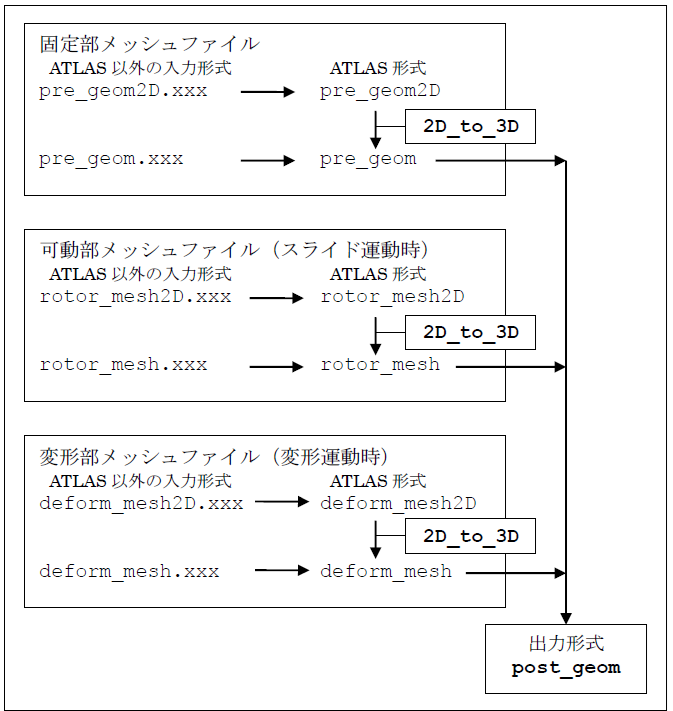
Input Mesh Data Conversion Flow