
12. Analysis Dimensions and Local Coordinate Systems#
Specifies the dimension of the analysis model. In a two-dimensional calculation, surface elements (first-order triangles and first-order quadrilaterals) read from the input mesh data file are extended in the symmetry direction by DELTA_Z or DELTA_THETA to generate first-order volume elements, and the problem is analyzed as a three-dimensional problem. When GEOMETRY = 0, the three-dimensional mesh is read from the file pre_geom. When GEOMETRY = 1, 2, 3, or 4, a two-dimensional mesh is read from the file pre_geom2D. For GEOMETRY = 4, define the surface elements of the two-dimensional model on the z=0 (x-y) plane when extending in the z direction, or on the y=0 (z-x) plane when extending in the angular direction.
Important
For two-dimensional analyses with GEOMETRY = 1 or 2, magnetic flux density is calculated on the mesh-defining plane and (eddy) current is calculated in the depth direction of the mesh. Specifically, for GEOMETRY = 1, Bx, By, and Jz are calculated; for GEOMETRY = 2, Bx, Bz, and Jy are calculated.
Defines a local coordinate system. It is used for material anisotropy ANISOTROPY(16.1), external current and magnetic-field sources COIL(17.1), magnetization-vector sources MAGNET(17.7), and three-dimensional extension of a two-dimensional mesh. The global coordinate system (Cartesian coordinate system) is defined by COORD_ID = 0, so it does not need to be defined when the global coordinate system is used.
Settings#
12_Geometry JSON key: Analysis dimension and local coordinate system object
GEOMETRY(12) Specifies the dimension of the input mesh
DELTA_Z_THETA(12) Sets the extension length for two-dimensional analysis
NO_LAYERS(12) Specifies the number of divisions over 360 degrees for two-dimensional axisymmetric analysis with GEOMETRY=3
ADD_SYMMETRY(12) Disables the boundary condition in the extension direction during two-dimensional analysis
PITCH(12) Sets the twist pitch of a helical mesh
COORDINATE(12) Title card for local coordinate systems
NO_COORDINATES(12) Number of local coordinate systems to define
COORD_ID(12) Identifier of the local coordinate system
TYPE(12) Specifies the type of local coordinate system
XYZ0(13) Coordinates of the local-coordinate-system origin in the global coordinate system
EX_XYZ(13) Unit vector in the x direction of the local coordinate system
EZ_XYZ(13) Unit vector in the z direction of the local coordinate system
Input format#
Text-format section
Analysis dimension
- Type:
Fixed parameter set
- Number of rows:
1
- Number of parameters:
5
* GEOMETRY * DELTA_Z_THETA * NO_LAYERS * ADD_SYMMETRY * PITCH *
    I         I             I           I            E
Local coordinate system
- Type:
Fixed parameter set
- Number of rows:
1
- Number of parameters:
2
*COORDINATE * NO_COORDINATES *
COORDINATE         I
To define a local coordinate system, set the following parameters.
- Type:
Additional parameter set
- Number of rows:
3*NO_COORDINATES
- Number of parameters:
5,3,3
* COORD_ID * TYPE   *    X0    *    Y0    *    Z0   *
    I         I          E          E          E
*                   *   EX_X   *   EX_Y   *   EX_Z  *
                        E          E          E
*                   *   EZ_X   *   EZ_Y   *   EZ_Z  *
                        E          E          E
JSON format#
"12_Geometry" :
{
    "GEOMETRY" : I,
    "DELTA_Z_THETA" : E,
    "NO_LAYERS" : I,
    "ADD_SYMMETRY" : I,
    "PITCH" : E,
    "COORDINATE" :
    [
        {
            "COORD_ID" : I,
            "TYPE" : I,
            "XYZ0" : [ E, E, E ],
            "EX_XYZ" : [ E, E, E ],
            "EZ_XYZ" : [ E, E, E ]
        }
    ]
},
Important
In JSON format, these parameters may be omitted; the default values are used. See the detailed description for the default values.
Detailed description#
12_Geometry#
- 12_Geometry#
- JSON key:
Analysis dimension and local coordinate system object
Analysis dimension#
Text-format section
- Type:
Fixed parameter set
- Number of rows:
1
- Number of parameters:
5
GEOMETRY#
- GEOMETRY(12)#
Text-format section
[row, col] = [1, 1]
Value |
Description |
|---|---|
0 |
Reads a three-dimensional mesh from the file pre_geom. |
1 |
Two-dimensional translationally symmetric calculation. Defined on the XY plane. Performs a calculation equivalent to a two-dimensional calculation using a three-dimensional mesh formed by extruding one layer in the Z direction by |
2 |
Two-dimensional axisymmetric calculation. Defined on the ZX plane. Performs a calculation equivalent to a two-dimensional calculation using a three-dimensional mesh formed by extruding one layer in the θ direction through an angle of |
3 |
When the analysis model is axisymmetric, automatically generates a three-dimensional mesh covering 360 degrees from the two-dimensional mesh. The applied magnetic field need not be axisymmetric, and a three-dimensional calculation is performed. |
4 |
Extends the two-dimensional mesh by multiple layers in the z or angular direction to create a three-dimensional mesh. The 2D_to_3D file is required. |
In a two-dimensional calculation, surface elements (first-order triangles and first-order quadrilaterals) read from the input mesh data file are extended in the symmetry direction by DELTA_Z or DELTA_THETA to generate first-order volume elements, and the problem is analyzed as a three-dimensional problem.
When GEOMETRY = 0, the three-dimensional mesh is read from the file pre_geom. When GEOMETRY = 1, 2, 3, or 4, a two-dimensional mesh is read from the file pre_geom2D. For GEOMETRY = 4, define the surface elements of the two-dimensional model on the z=0 (x-y) plane when extending in the z direction, or on the y=0 (z-x) plane when extending in the angular direction.
DELTA_Z_THETA#
- DELTA_Z_THETA(12)#
Text-format section
[row, col] = [1, 2]
- Type:
Real number (E)
- Value:
>= 0
- Unit:
m (
GEOMETRY= 1), degree (GEOMETRY= 2)- Description:
Specify when
GEOMETRY= 1 or 2. Not required whenGEOMETRY= 0, 3, or 4.When
GEOMETRY= 1,DELTA_Zis the element length in the z direction (m).When
GEOMETRY= 2,DELTA_THETAis the element angle in the angular direction (degrees).- Default value:
0
NO_LAYERS#
- NO_LAYERS(12)#
Text-format section
[row, col] = [1, 3]
- Type:
Integer (I)
- Value:
>= 0
- Description:
Not required when
GEOMETRY= 1 or 2. WhenGEOMETRY= 3, use this to specify the number ofNO_LAYERlayers when automatically generating a 360-degree three-dimensional mesh from the two-dimensional mesh. Specifying 0 creates 360 layers (default). Specify 0 whenGEOMETRY= 1.- Default value:
0
ADD_SYMMETRY#
- ADD_SYMMETRY(12)#
Text-format section
[row, col] = [1, 4]
Value |
Description |
|---|---|
0 |
Set the boundary condition Default value |
1 |
Does not set a Bn=0 surface on the XY plane when |
PITCH#
- PITCH(12)#
Text-format section
[row, col] = [1, 5]
- Type:
Real number (E)
- Description:
When
GEOMETRY= 1 (a one-layer extruded mesh), entering a nonzero value (m) applies a twist deformation to the mesh using the value as the twist pitch (m) of the helical mesh.PITCH> 0: right-hand screw direction; < 0: left-hand screw direction.- Default value:
0
Note
Revision history
Added an option to configure a helical mesh in two-dimensional analysis
Local coordinate system#
Text-format section
- Type:
Fixed parameter set
- Number of rows:
1
- Number of parameters:
2
- Type:
Additional parameter set
- Number of rows:
3*NO_COORDINATES
- Number of parameters:
5,3,3
COORDINATE#
- COORDINATE(12)#
Text-format section
[row, col] = [1, 1]
- Type:
String (S)
- Description:
Specifies
COORDINATE.
Additional data#
Text-format section
- Type:
Additional parameter set
- Number of rows:
3*NO_COORDINATES
- Number of parameters:
5,3,3
COORD_ID#
- COORD_ID(12)#
Text-format section
[row, col] = [2, 1]
- Type:
Integer (I)
- Value:
>= 1
- Description:
Identifier of the local coordinate system.
Caution
Identifier 0 denotes the global coordinate system and does not need to be entered.
TYPE#
- TYPE(12)#
Text-format section
[row, col] = [2, 2]
Value |
Description |
|---|---|
1 |
Cartesian coordinate system. Uses (x,y,z) as the local coordinates. |
2 |
Cylindrical coordinate system. Uses (r, \(\theta\) ,z) as the local coordinates. |
XYZ0#
- XYZ0(13)#
Text-format section
[row, col] = [2, 3]~[2, 5]
- Type:
Real number (E)
- Description:
Components X0, Y0, and Z0 of the local coordinate-system origin in the global coordinate system. Specify as an array.
EX_XYZ#
- EX_XYZ(13)#
Text-format section
[row, col] = [3, 1]~[3, 3]
- Type:
Real number (E)
- Description:
Components of the local coordinate system’s x-direction unit vector \(e_x\) in the global coordinate system. Specify as an array. Set \(|e_x|=1\).
EZ_XYZ#
- EZ_XYZ(13)#
Text-format section
[row, col] = [4, 1]~[4, 3]
- Type:
Real number (E)
- Description:
Components of the local coordinate system’s z-direction unit vector \(e_z\) in the global coordinate system. Specify as an array.
For a cylindrical coordinate system (
TYPE= 2), the z axis is the axis of rotation and the angle is zero on the x axis.Set \(|e_z|=1\). Set \(e_x \cdot e_y =1\).
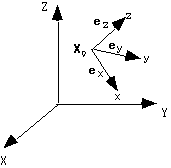
Figure: Example of a local coordinate system#